Architecture
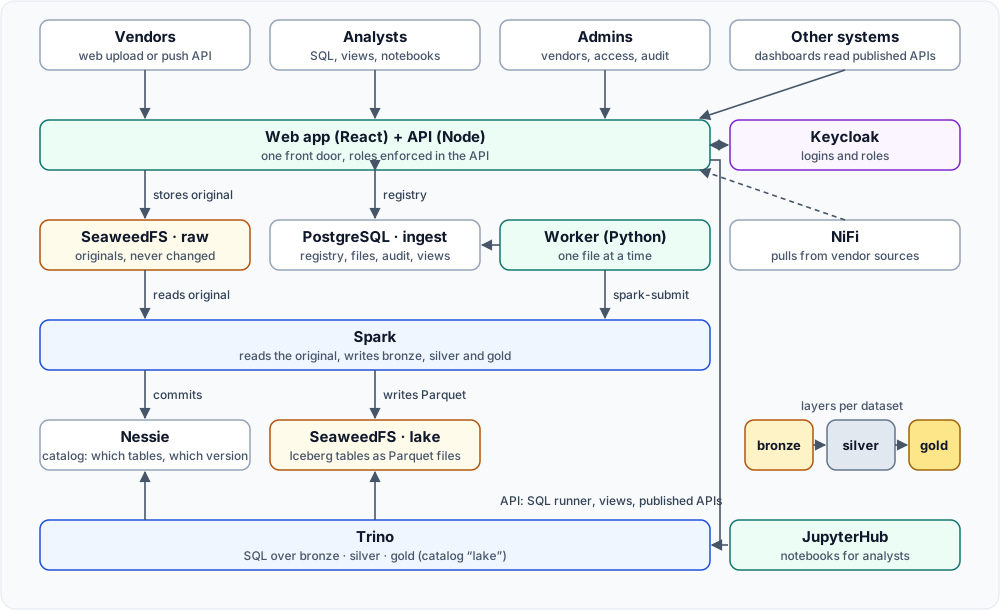
The parts
Section titled “The parts”| Part | Role in one line | Details |
|---|---|---|
| Web app (React) | The one website for vendors, analysts and admins | Web app |
| API (Node) | Every rule lives here: roles, uploads, SQL checks, views, audit | API |
| Worker (Python) | Turns uploaded files into lake tables using Spark | Worker |
| Keycloak | Logins and the roles vendor, analyst, admin |
Keycloak |
| PostgreSQL 16 | The registry (ingest), the catalog store (nessie), logins (keycloak), and the old serving database |
PostgreSQL |
| SeaweedFS | S3 storage: bucket raw (originals) and bucket lake (table files) |
SeaweedFS |
| Nessie | The Iceberg catalog: which tables exist and which version is current | Nessie |
| Spark | Reads an original, writes bronze, silver and gold | Spark |
| Trino | SQL over the lake tables | Trino |
| NiFi | Pulls files from vendor databases, APIs and SFTP | NiFi |
| JupyterHub | A notebook per analyst, logged in with the same account | JupyterHub |
| PostgREST | The earlier way to serve tables as REST; still installed, no longer used by new work | PostgREST |
| lakestatus | One-screen health report of the server | lakestatus |
The journey of a file
Section titled “The journey of a file”- Upload. A vendor drops a file on a folder page, or a vendor system calls the push API. The API checks the login or the push key, streams the file into the
rawbucket while computing its size and SHA-256, and writes one row infilesplus the first audit row infile_events. - Pick-up. The worker polls the registry for the oldest file with status
uploadedand marks itprocessing. - Process. The worker starts a Spark job. The job reads the original and writes three Iceberg tables for that folder: bronze (exactly as received, plus lineage columns), silver (trimmed, typed, de-duplicated), gold (distinct rows across all files of the folder). It reports each stage and the worker records it, so the web page shows progress live.
- Done. The file becomes
processedwith row counts, orfailedwith the reason and the stage where it stopped. - Query. Trino reads the tables through the Nessie catalog. The API lets an analyst query only the datasets of projects they were given.
- Publish. An analyst saves a query as a view. The API builds the result through bronze, silver and gold again, and can publish the gold table as
GET /api/v1/data/<name>, opened with an API key. When new source data arrives the view is rebuilt.
Four server roles
Section titled “Four server roles”On staging all roles share one machine. In production each role is a separate server; only the settings file changes.
| Role | Runs | Setting in cluster.env |
|---|---|---|
| Ingestion and control | NiFi, Nessie, PostgREST (and Keycloak, JupyterHub) | INGEST_HOST |
| Processing | Spark, the worker | PROCESS_HOST |
| Query and serving | Trino, PostgreSQL | QUERY_HOST |
| Storage | SeaweedFS | STORAGE_HOST |
Every service finds its neighbours only through these four names, which is why moving a service to its own server is a settings change and not a code change. See Settings.
Rules that shape the design
Section titled “Rules that shape the design”- No containers. Every service is a systemd unit running as the system user
lake, installed under/opt/<service>with its configuration under/etc/lake/<service>. - Services listen on localhost. People reach them through SSH tunnels in development, and through VPN, firewall rules and TLS in a data centre. Nothing is bound to every interface for convenience.
- Access rules live in the API, not in the user interface and not in the individual tools. The UI only hides what the API would refuse anyway.
- Originals are never modified. Raw files are written once under a unique key. Everything else can be rebuilt from them.
- Every change is a script. If something was done on a server by hand, it is lost at the next rebuild. See Scripts.